comark-github
GitHub
Write > [!NOTE], @user,
Note
Drafts save every few seconds, so closing the tab keeps your work.
Tip
Press ⌘K to search every document.
Important
Releases ship from main only.
Warning
Changing the slug breaks links people already shared.
Caution
Deleting a folder deletes every document in it.
> [!NOTE]
> Drafts save every few seconds, so closing the tab keeps your work.

> [!TIP]
> Press ⌘K to search every document.

> [!IMPORTANT]
> Releases ship from `main` only.

> [!WARNING]
> Changing the slug breaks links people already shared.

> [!CAUTION]
> Deleting a folder deletes every document in it.Decision
Keep the existing endpoint. Clients pin its response shape.
> [!IMPORTANT] Decision
> Keep the existing endpoint. Clients pin its response shape.Breaking change in v2
render(markdown) is gone. Create a renderer once instead:
- pass it your
pluginsandcomponents - key
componentsby tag name
const render = createHtmlRenderer({ plugins, components });> [!WARNING] Breaking change in v2
> `render(markdown)` is gone. Create a renderer once instead:
>
> - pass it your `plugins` and `components`
> - key `components` by tag name
>
> ```ts
> const render = createHtmlRenderer({ plugins, components });
> ```Thanks @onmax: this fixes #51, and onmax/comark-ui#73 builds on it.
Thanks @onmax: this fixes #51, and onmax/comark-ui#73 builds on it.Press ⌘ K to search. Water is H2O.
Where did the script go?
The source has a<script> after this sentence. GitHub drops it, and so does html(). Press <kbd>⌘</kbd> <kbd>K</kbd> to search. Water is H<sub>2</sub>O.
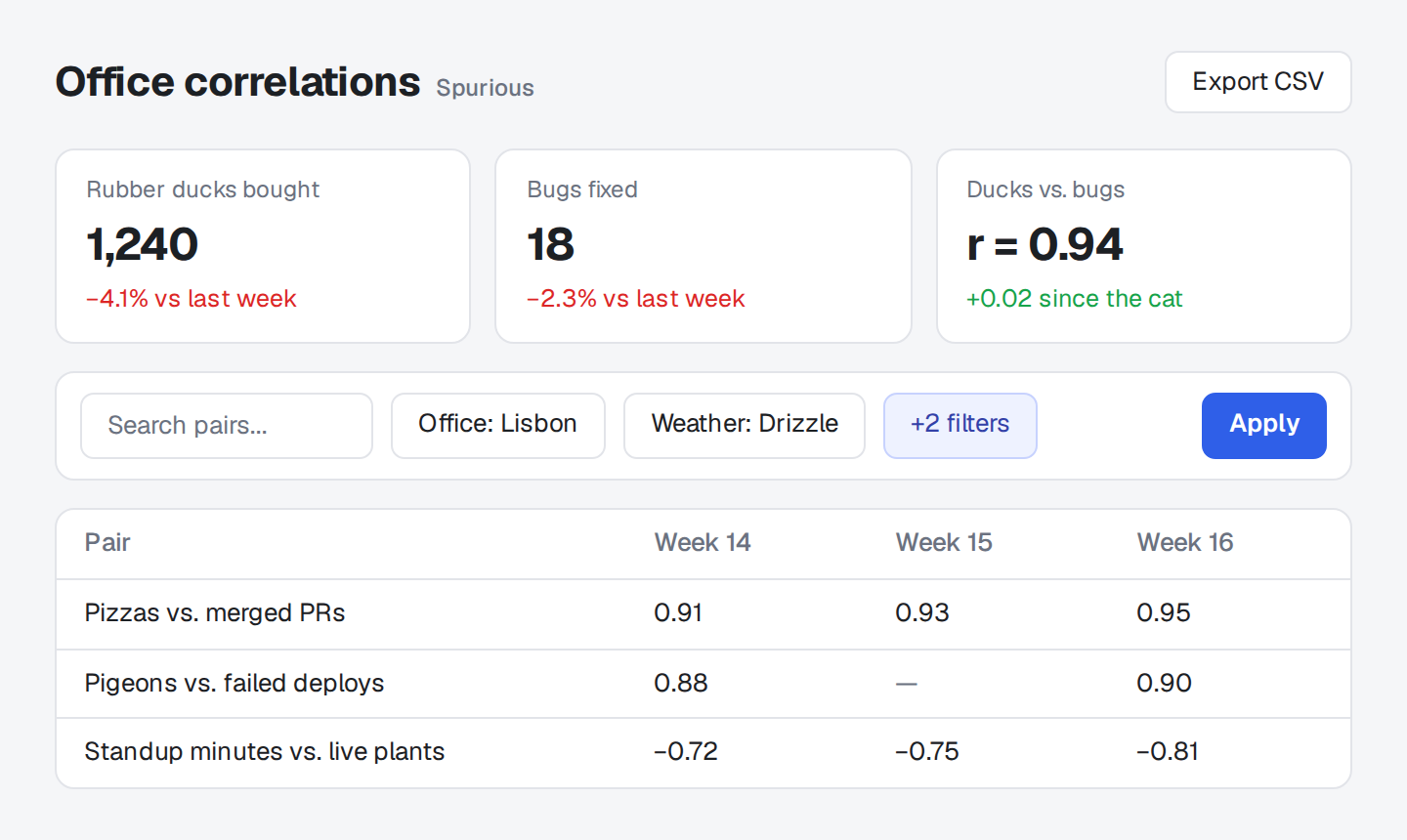
<img src="/dashboard.png" width="480" alt="Office correlations: ducks vs. bugs, r = 0.94">
<details>
<summary>Where did the script go?</summary>
The source has a <code><script></code> after this sentence. GitHub drops it, and so does <code>html()</code>. <script>alert("hi")</script>
</details>Three plugins, each one on its own:
callouts()draws GitHub's five alerts with an icon, a color, and a title. Text after the marker on its line replaces the title. Comark's built-in alert plugin only tags the quote with its type and leaves the drawing to you.references({ repo })links@userto the profile and#123orowner/name#123to the issue or pull request, as GitHub does in comments.html()renders raw HTML the way GitHub does. GitHub's tags and attributes stay, and scripts and anything else it doesn't allow go. Comark renders all raw HTML as written.
Callouts
Section titled "Callouts"> [!TYPE] Optional title
> The body: any Markdown, over as many lines as it needs.| Type | Use it for |
|---|---|
NOTE |
Context the reader should know, even when skimming |
TIP |
A better or faster way to do something |
IMPORTANT |
Something the reader needs to succeed |
WARNING |
A risk that needs their attention now |
CAUTION |
An action with consequences they can't undo |
The marker is case-insensitive. Callouts work inside lists and other blocks. A quote marked with any other type, such as [!INFO], stays a plain quote, and meta.issues names it, with its own rule in Doctor.
References
Section titled "References"| Written | Links to |
|---|---|
@user |
https://github.com/user |
#123 |
https://github.com/<repo>/issues/123, when repo is set; GitHub redirects it to the pull request when it is one |
owner/name#123 |
https://github.com/owner/name/issues/123 |
A reference must stand on its own: me@example.com, C#9, and @comark/html stay text. So does anything in a link or in code.
These tags stay, as on GitHub: a, abbr, b, bdo, blockquote, br, caption, cite, code, dd, del, details, dfn, div, dl, dt, em, figcaption, figure, h1 to h6, hr, i, img, ins, kbd, li, mark, ol, p, picture, pre, q, rp, rt, ruby, s, samp, small, source, span, strike, strong, sub, summary, sup, table, tbody, td, tfoot, th, thead, time, tr, tt, ul, var, and wbr.
scriptandstyleare removed with their content. Any other tag, such asiframe,form, or a component's tag, is replaced by its content.- Attributes that change the layout or describe the content stay, such as
align,width,height,alt,title,open,colspan, andaria-label, plushrefon links,srcandsrcseton images, andsrcsetandmediaonsource.class,id,style, and event handlers such asonclickgo. - A URL must be relative, http, or https, or mailto in a link. Any other, such as
javascript:ordata:, is removed.
Markdown between an HTML tag and its closing tag, after a blank line, renders after the element instead of inside it, until Comark fixes comark#235. Content on the lines right after the opening tag, with no blank line, stays inside, but as plain text.
Options
Section titled "Options"Options go under github in comarkUi(), by plugin, such as comarkUi({ github: { references: { repo: "onmax/comark-ui" } } }), or to each plugin function when you use it alone. false in place of a plugin's options turns that plugin off, and github: false turns off all three.
callouts({ titles: { note: "Nota", warning: "Aviso" } }) changes the default titles, for a site in another language.
references({ repo: "owner/name" }) is the repository a bare #123 points into. Without it, #123 stays text, while @user and owner/name#123 still link. meta.issues reports a repo that isn't owner/name, with its own rule in Doctor.
html() takes no options. It keeps GitHub's allowed tags and attributes; HTML lists what goes.
Package
Section titled "Package"comark-ui brings comark-github and registers its three plugins. To use it alone, install it, register the plugins you want, and pass the renderer's components:
pnpm add comark @comark/html comark-githubimport { createHtmlRenderer } from "@comark/html";
import { callouts, components, html, references } from "comark-github/html";
const render = createHtmlRenderer({
plugins: [callouts(), references({ repo: "onmax/comark-ui" }), html()],
components,
});Each plugin works alone, in any order. callouts() is named alert and html() is named html, so they take the place of Comark's built-in plugins of those names. They work with registerDefaultPlugins: false too.
For Vue, React, or Svelte, import from comark-github/vue, comark-github/react, or comark-github/svelte. The callout components add the styles when they mount. When you render on a server, import comark-github/style.css with your own styles so the page doesn't shift. Renderers covers using it with other plugins.
Callouts follow shadcn/ui's Alert, a bordered card with the icon and title in the type's color. References and the HTML GitHub allows render as plain elements, so your page's styles apply to them. The rules sit in a comark CSS layer, so any plain rule of your own wins.
Shared tokens
Section titled "Shared tokens"Callouts read these shared tokens:
| Token | Used for |
|---|---|
--comark-background |
The card |
--comark-muted |
The body |
--comark-border |
The card's border |
--comark-radius |
The card's corners |
--comark-font |
All text |
Variables
Section titled "Variables"Set them on .cgc:
| Variable | Default | Used for |
|---|---|---|
--cgc-note |
#2563eb, #60a5fa in dark mode |
NOTE |
--cgc-tip |
#16a34a, #4ade80 in dark mode |
TIP |
--cgc-important |
#7c3aed, #a78bfa in dark mode |
IMPORTANT |
--cgc-warning |
#d97706, #fbbf24 in dark mode |
WARNING |
--cgc-caution |
shadcn/ui's --destructive, else #dc2626, #f87171 in dark mode |
CAUTION |
Each color goes to the type's icon and title.
Classes
Section titled "Classes"A callout is a .cgc with data-type: note, tip, important, warning, or caution. It holds .cgc-icon, .cgc-title, and .cgc-body.
.cgc {
  --cgc-note: oklch(0.55 0.2 260);
}