Agent skill
Before/after evidence
Your agent captures both states the same way, measures each mark from the page or the pixels, and checks the render before a reviewer opens it.
Install the global Vite+ CLI before running this command. Without it, replace vp dlx with pnpm dlx.
Pick before-after-evidence from the list.
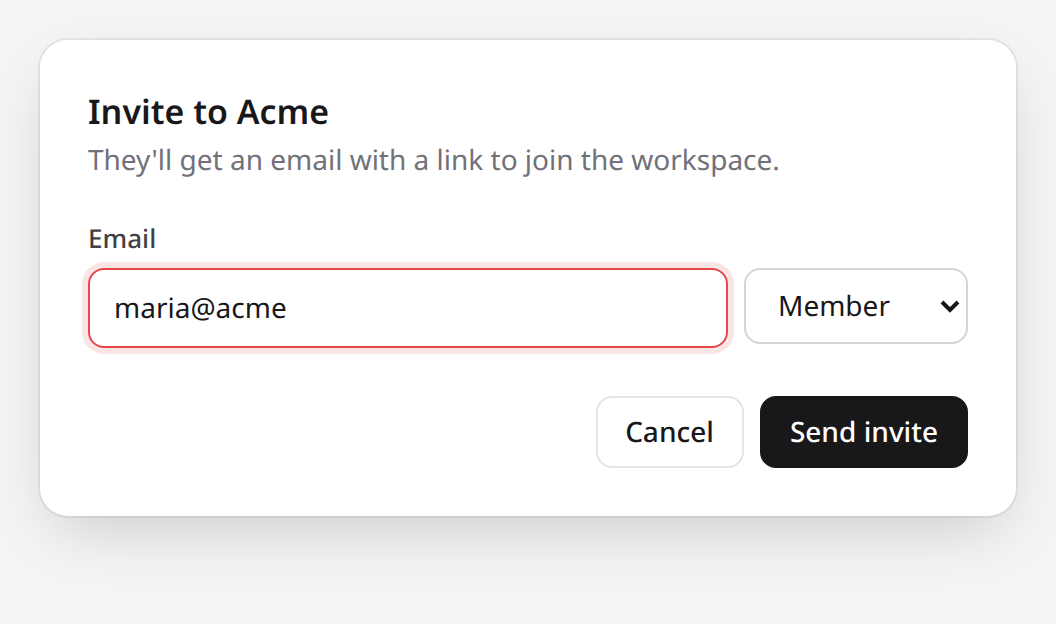
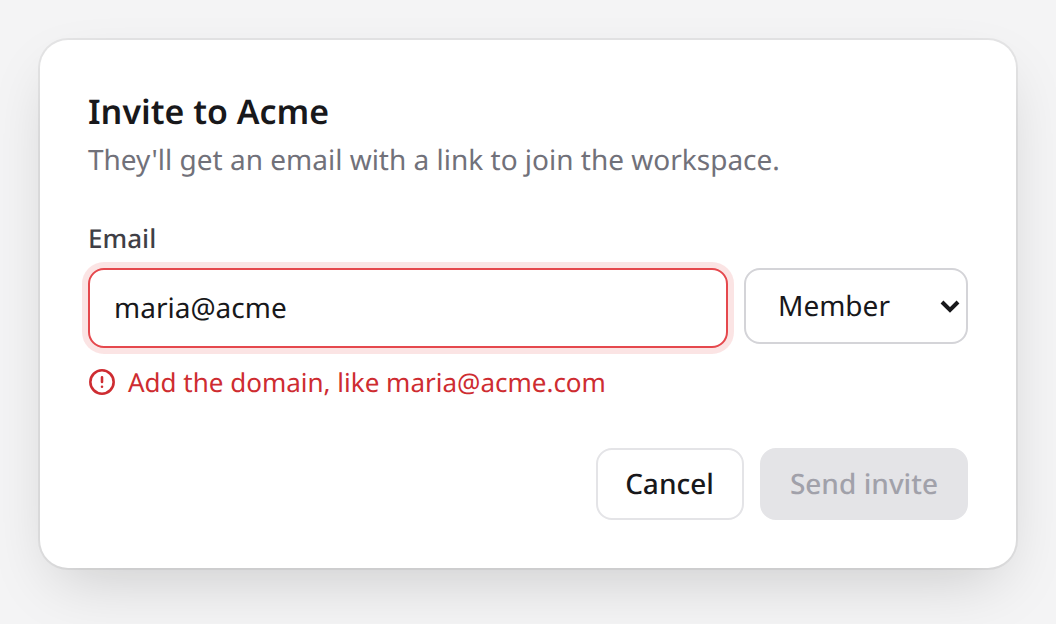
The invite dialog now says what's wrong with an address, and waits for a valid one before it sends.
Open Settings › Members, select Invite, type maria@acme, and press Tab.
 12
- 1Only the border turns red. Nothing says what to fix.
- 2Send invite still sends to
maria@acme.
 34
- 3"Add the domain, like maria@acme.com"
- 4Send invite waits for a valid address.
| <input id="email" aria-invalid={invalid} value={email} onChange={edit} /> | ||
| <button className="primary" onClick={send}>Send invite</button> | ||
| <input id="email" aria-invalid={invalid} aria-describedby="email-error" value={email} onChange={edit} /> | ||
| {invalid && <p id="email-error" className="error">Add the domain, like {suggestion}</p>} | ||
| <button className="primary" onClick={send} disabled={invalid}>Send invite</button> |
The invite dialog now says what's wrong with an address, and waits for a valid one before it sends.

Open **Settings › Members**, select **Invite**, type `maria@acme`, and press Tab.

::compare{title="Invite dialog with an incomplete address"}
:::screenshot{src="https://comark-ui.onmax.me/skill-invite-before.png" alt="Invite dialog with a red email field and no message" viewport="640x420"}
::::annotation{x=8.3 y=42.9 w=60.6 h=12.8 color="red"}
Only the border turns red. Nothing says what to fix.
::::

::::annotation{x=72 y=63.5 w=19.7 h=11.5 color="red"}
**Send invite** still sends to `maria@acme`.
::::
:::

:::screenshot{src="https://comark-ui.onmax.me/skill-invite-after.png" alt="Invite dialog with an error under the email field and a disabled Send invite button" viewport="640x420" href="https://pr-218.preview.acme.example/settings/members"}
::::annotation{x=8.3 y=58.3 w=49 h=5.8 mark="underline" color="green"}
"Add the domain, like maria@acme.com"
::::

::::annotation{x=72 y=71.8 w=19.7 h=11.5 color="green"}
**Send invite** waits for a valid address.
::::
:::
::

::diff{line=42 label="The change"}
```tsx [src/members/InviteDialog.tsx]
<input id="email" aria-invalid={invalid} value={email} onChange={edit} />
<button className="primary" onClick={send}>Send invite</button>
```
```tsx
<input id="email" aria-invalid={invalid} aria-describedby="email-error" value={email} onChange={edit} />
{invalid && <p id="email-error" className="error">Add the domain, like {suggestion}</p>}
<button className="primary" onClick={send} disabled={invalid}>Send invite</button>
```
::What it does
Section titled "What it does"The skill turns a visible change into a ::compare of two screenshots, so a reviewer can check it without running the branch. It sends both sides or neither. If it can't capture the old state the same way as the new one, it stops and tells you what blocked it.
When to use it
Section titled "When to use it"Ask in your own words, such as "Add before and after screenshots of the invite dialog to the PR." Your agent loads the skill for requests about a visible change. To be sure, say "Use the before-after-evidence skill."
Choose by what you want:
- Proof that a UI change, bug fix, or design change looks right: this skill.
- A review with several findings, one of them visible: Review document, with this compare as that finding's evidence.
- How a screen or flow works, not what changed: Visual explanation.
What your agent needs
Section titled "What your agent needs"- A browser it can drive, such as Playwright, to capture both states and read each mark's box from the page. With only a screen recording or a design export, it measures marks in pixels.
- Both states of the change, as deployments or commits it can run, or comparable images from a recording or design export.
It's working if
Section titled "It's working if"- The two images are the same size and differ only where the change is.
- Each mark sits on the field, label, or button that changed, red before and green after, and nothing unchanged is marked. A guessed box on a half-width image lands on the neighbouring button, so the agent measures every mark.
- Each note uses words visible on its side.
- The document is one sentence, one line of steps to reach the screen, and the compare. Test runs and retries go in the agent's report to you, not in the evidence.
- The report names any mark the agent couldn't check in the render.