Skills
Each skill teaches your agent one kind of document, what goes in it and in what order, and shows a finished example. Install the ones you need.
The invite dialog now says what's wrong with an address, and waits for a valid one before it sends.
Open Settings › Members, select Invite, type
maria@acme, and press Tab.Before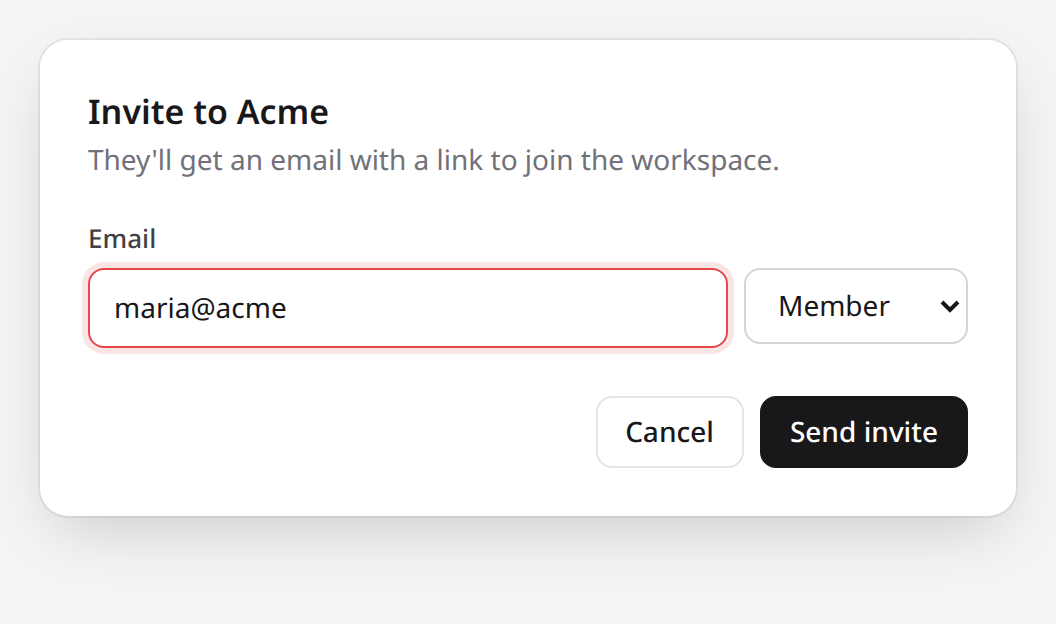 12
- 1Only the border turns red. Nothing says what to fix.
- 2Send invite still sends to
maria@acme.
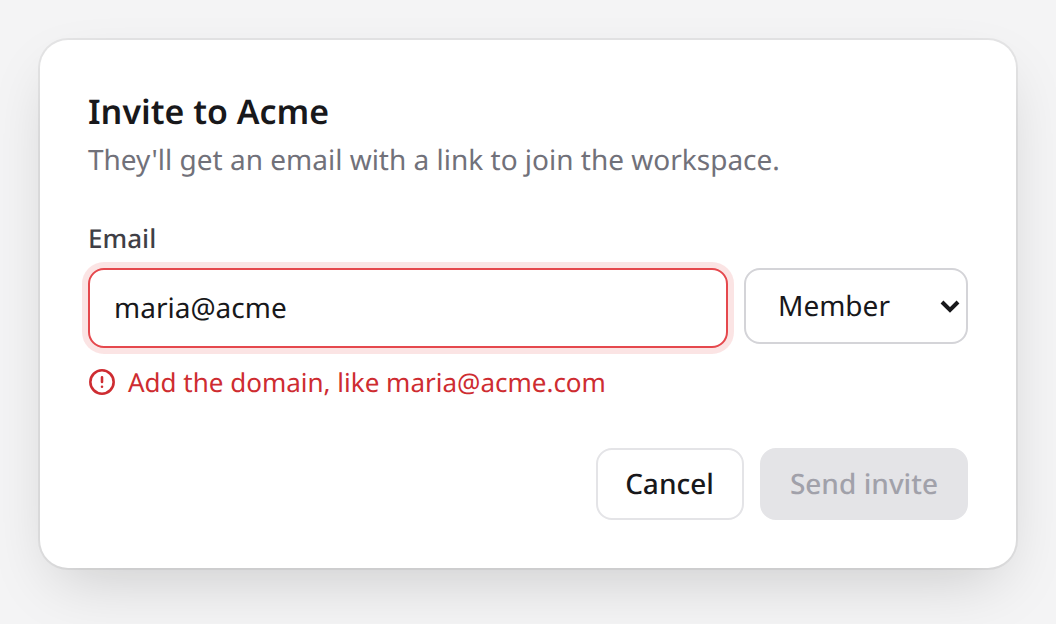 34
- 3"Add the domain, like maria@acme.com"
- 4Send invite waits for a valid address.
1 / 2The changesrc/members/InviteDialog.tsx+3 −2 <input id="email" aria-invalid={invalid} value={email} onChange={edit} /> <button className="primary" onClick={send}>Send invite</button> <input id="email" aria-invalid={invalid} aria-describedby="email-error" value={email} onChange={edit} /> {invalid && <p id="email-error" className="error">Add the domain, like {suggestion}</p>} <button className="primary" onClick={send} disabled={invalid}>Send invite</button> Before/after evidenceTwo comparable screenshots with measured marks, for any change people can see.
- 1
Review: avatar cache
Request changes
One blocking finding: after a large avatar loads, every smaller one on the page shows the large image. The fix is one line.
Reviewed
 acme/web#418 at
9f3c2e1.1. Small avatars load the 512px image (blocking)
Section titled "1. Small avatars load the 512px image (blocking)"src/avatars/cache.ts:18. The cache key is the user's id alone, so once the profile header loads someone's 512px avatar, the 32px avatars in comments get the same file. Reproduced with a test:pnpm test src/avatars1 passed1 failed180 ms
cache.test.ts › returns a 32px avatar after a 512px one
AssertionError: expected 512 to be 32 at cache.test.ts:27:31Fixsrc/avatars/cache.ts+1 −1 const key = user.id; const key = `${user.id}:${size}`; 2. The cache never evicts (should fix)
Section titled "2. The cache never evicts (should fix)"src/avatars/cache.ts:9. Read in the code, not measured: the map grows by one entry per user and size for as long as the tab stays open, which on the team directory is thousands of images.const cache = new Map<string, Blob>();Cap it, such as an LRU of 500 entries, or decide the tab's lifetime is short enough not to.
Checked
Section titled "Checked"- Ran
pnpm test src/avatars: one failure, above. - Opened a profile on the preview at 1440px and watched the comment avatars after the header loaded.
Not checked
Section titled "Not checked"- Server rendering: the cache only runs in the browser, and I didn't confirm the server skips it.
- Safari's memory use.
Review documentA verdict first, then each finding ranked with its location, evidence, and fix.
- Ran
How a Comark document becomes HTML
Parsing and rendering are two separate calls, and the plugins do their work in the first. That's why a block's problems are known before any HTML exists.
A plugin can join at three points: its Markdown rules while the text becomes tokens,
markdownItPoston the tokens, andposton the tree. The last arrow is the renderer, which only maps each node to a component.In code, the diagram is three lines:
Visual explanationOne question answered with the smallest diagram, tree, or screenshot that shows it.
Keep both writers' changes
After this lesson, you can predict how a server handles two changes to the same record, with or without a version check.
Why it matters
Section titled "Why it matters"In this example, Ana and Ben open the same help article. Ana corrects a spelling error and saves the article. Ben adds a paragraph to his older copy and saves it. His save removes Ana's correction without a warning. This is a lost update.
The idea
Section titled "The idea"An ETag is a version label, such as
"v7", that the server sends with a resource. The If-Match header carries that label back to require the same version before saving a change. If the labels match, the server saves the change. If the labels differ, the server returns412 Precondition Failedand keeps the resource unchanged.Worked example
Section titled "Worked example"Both load version 7
Section titled "Both load version 7"Ana and Ben each
GET /articles/42, and both getETag: "v7".Ana saves first
Section titled "Ana saves first"PUT /articles/42 If-Match: "v7"The article is still at
"v7". The server saves Ana's change and returns200 OKwithETag: "v8".Ben saves second
Section titled "Ben saves second"PUT /articles/42 If-Match: "v7"The article is now at
"v8". The labels differ, so the server returns412 Precondition Failed. Ana's correction stays.Ben reloads and merges
Section titled "Ben reloads and merges"Ben's editor fetches
"v8"and shows Ana's correction. Ben adds his paragraph to that version. He saves again withIf-Match: "v8".
Check yourself
Section titled "Check yourself"1.This API accepts requests without
If-Match. Ben's editor sends hisPUTwithout that header. The article is at"v8". What happens?Show answer
The server merges Ben's paragraph into version 8The server does not combine the two versions. After a 412 response, the client must get the current version and combine the changes.Correct answerThe server saves Ben's version and removes Ana's correctionWithoutIf-Match, the server has no version condition to check. The server saves Ben's version. This removes Ana's correction.The server refuses the save with a 412 status codeA 412 response requires a condition that failed. Ben sent no condition, so the server has no labels to compare.The client must send its original version label forIf-Matchto protect the change. An API can require that header. If the header is absent, that API can return428 Precondition Required.2.What does a server answer when
If-Matchnames an old version?Show answer
412 Precondition Failed, and it leaves the resource unchanged.Read next
Section titled "Read next" RFC 9110, section 13.1.1 defines
If-Match.The next lesson explains weak ETags and why
W/"v7"never matchesIf-Match.Teach lessonOne concept in simplified English, a worked example, and a question to check that you can apply it.
Which one
Section titled "Which one"- A visible change needs proof on a pull request: Before/after evidence.
- A review is done, and someone has to decide what to do: Review document.
- Someone asked how a system, a flow, or a change works: Visual explanation.
- Someone needs to learn one concept and prove it: Teach lesson.
- Your agent needs a block's syntax, not a whole document: the comark-ui skill.
- A diff needs reviewing: your review process. These skills write documents. They don't find problems.
- The document needs a link, comments, or saved answers: your host, such as Drop.
Install
Section titled "Install"Install them with the skills CLI:
vp dlx skills add onmax/comark-uivp comes with Vite+. Without it, pnpm dlx and pnpm exec take the same arguments.
It lists every skill in the repository, comark-ui's included, and installs the ones you pick. Each document skill carries the syntax of the blocks it uses, so it works without comark-ui.
From npm
Section titled "From npm"The comark-ui package ships every skill in dist/skills/. The skills CLI's sync command links them from node_modules, so they match the comark-ui version you render with:
pnpm add -D skills comark-ui
vp exec skills experimental_sync -a claude-code -y
Sync links each skill into .agents/skills/ and the directory of each agent you pass with -a, and records them in skills-lock.json. Installing the package alone does nothing, so rerun sync after each upgrade or add it to a prepare script, as the CLI reference shows. The command is experimental, so its name and options may change.
Use them
Section titled "Use them"Ask in your own words, such as "Write up your review of #418." Your agent loads the skill whose description matches. To be sure, name it, as in "Use the review-document skill." The skills combine, so a review document can carry a before/after compare as one finding's evidence.
Each skill starts from the finished example rendered on its page, and each step ends with a check the agent passes before the next. Before handing it over, the agent lints the document with vp dlx, or pnpm dlx without Vite+, and looks at the render, so it needs Node and a browser.
Bundle them in your app
Section titled "Bundle them in your app"An app that serves skills to its own agents imports them from comark-ui, so they match the plugins it renders with:
import { skills, version } from "comark-ui/skills";

const lesson = skills.find((skill) => skill.name === "teach-lesson");
for (const file of lesson.files) serve(`/skills/${lesson.name}/${file.path}`, file.text);Each skill has a name, a description, its parsed frontmatter, and its files. Each file has a path from the skill's folder and its text, with SKILL.md first. The text is inlined, so a Worker can serve it without reading node_modules. version is the comark-ui version they came from, for a cache key or a digest.
To install a skill as a folder instead, copy the whole folder, since SKILL.md links its references by path:
import { cp } from "node:fs/promises";
import { dirname } from "node:path";
import { fileURLToPath } from "node:url";

const folder = dirname(fileURLToPath(import.meta.resolve("comark-ui/skills/review-document/SKILL.md")));
await cp(folder, ".agents/skills/review-document", { recursive: true });